Ataroi EMET
Evaluation, Monitoring, Enforcement & Trust
Ataroi EMET is an AI observability and governance platform that gives organizations complete visibility into what their AI agents are doing — every file accessed, every command executed, every prompt submitted. Purpose-built for organizations deploying agentic AI — coding assistants such as Claude Code and GitHub Copilot among them — EMET makes it possible to adopt autonomous AI with confidence.
The Problem
Organizations are cautious about deploying agentic AI because they have no visibility into:
- What files and code the AI reads (including credentials and sensitive data)
- What shell commands the AI executes
- What version control operations the AI performs
- How to demonstrate compliance with SOC 2, HIPAA, ISO 27001, or GDPR requirements
- Whether anomalous or risky AI behavior is occurring
Without this visibility, security and compliance teams cannot approve AI tool adoption. With it, they can.
What EMET Does
EMET is built around a modular AI agent integration layer. Using adapters, EMET can capture events from nearly any agent platform. Today we support both Claude Code and GitHub Copilot, with more coming in the near future.
EMET captures a complete, tamper-resistant audit trail of AI agent activity and makes it searchable, alertable, and reportable.
Core Capabilities
Event Capture A lightweight sensor runs alongside AI agents on every user's workstation. The sensor integrates with the agent platform's event mechanism to capture every tool invocation, command execution, file operation, and session event. Events are cryptographically signed and transmitted securely to your EMET server.
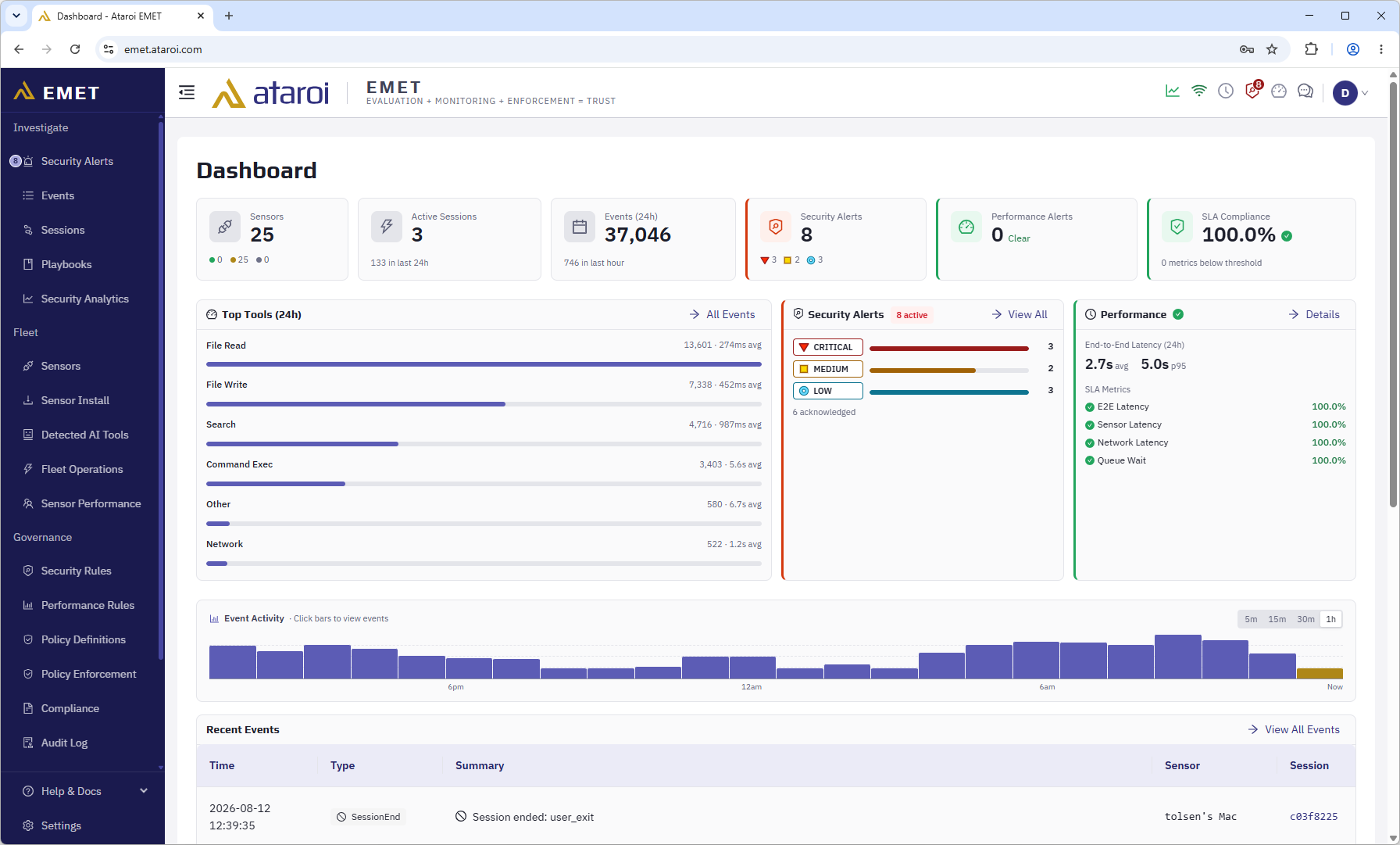
Centralized Analytics All events are stored in purpose-built storage with automatic data lifecycle management. The EMET dashboard provides a searchable, filterable event timeline across all sensors and sessions.
Security Alerting Built-in security rules detect credential access, suspicious command patterns, lateral movement, and other risky behaviors. Pattern-matching security rules evaluate each event as it arrives. Alerts are delivered to the dashboard and to email, Slack and Microsoft Teams notification channels you configure.
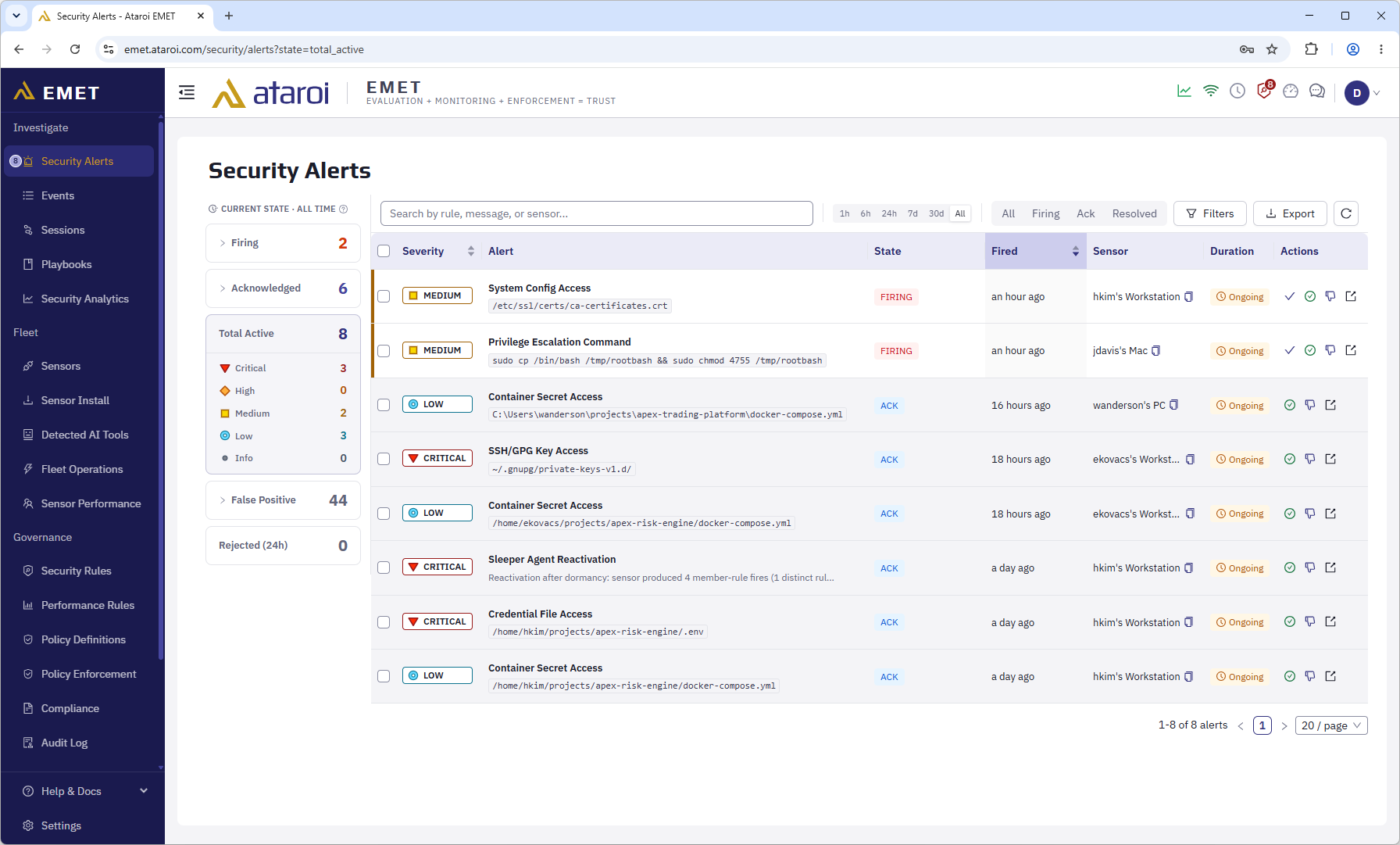
Performance Monitoring Built-in performance rules track end-to-end latency, queue backlog, and sensor health. Pipeline-latency rules have configurable thresholds.
SIEM Integration Forward events to your existing SIEM infrastructure. EMET supports CrowdStrike Falcon LogScale and a generic webhook connector for any other destination.
Compliance Reporting Export event data and security alerts in CSV or JSON. EMET's audit trail is designed to support SOC 2, HIPAA, ISO 27001, and GDPR evidence collection.
Policy Enforcement Define rules that govern what AI agents are permitted to do. Enforcement actions (warn, block, and other policy responses) are applied at the sensor level before actions are executed. EMET includes built-in policy rules for common risk scenarios, and you can create custom rules to fit your organization's specific policies.
Architecture
EMET consists of four main components that work together:
User Computers
  emet-sensor
  AI agent integration (Claude Code and GitHub Copilot hooks)
        |
        | TLS 1.3 + cryptographically signed batches
        v
Ingestion Service
        |
        v
Message Broker
        |
        v
Processing Service
        |
        v
Database
        |
        v
API Service
        |
        v
EMET Dashboard
Sensor: A lightweight native binary that runs on user workstations alongside AI agents. It integrates with the AI agent platform to capture activity locally before transmitting events in batches to the ingestion service. The sensor is designed for imperceptible latency impact and resilience (events queue locally if the server is unreachable).
Backend: Three services handle ingestion, processing, and API. Each is stateless and horizontally scalable.
Storage: Purpose-built storage with automatic data lifecycle management. Object storage is used for long-term archival.
Dashboard: A modern web-based application. Detailed dashboard documentation is available to customers inside the authenticated docs portal, accessible from the dashboard itself.
Deployment Models
| Model | Description | Who It's For |
|---|---|---|
| Cloud SaaS | Hosted by Ataroi | Teams that want managed infrastructure |
| Self-Hosted | Run in your own environment (Coming soon) | Organizations with data residency requirements |
| Air-Gapped | Run in your own environment with no direct Internet access (Coming soon) | Organizations with data residency and privacy requirements |
Cloud SaaS is currently available. Self-hosted and air-gapped deployment options are in development and will be available
soon. Contact sales@ataroi.com to be notified when self-hosted availability is announced.
Pricing
Visit Pricing Plans for current plan details and to start a free trial.
Who Uses EMET
EMET is designed for organizations of all sizes, including those in regulated industries:
- Finance — Regulatory compliance, audit trails, IP protection
- Healthcare — HIPAA compliance, PHI access monitoring
- Government — Data sovereignty, security clearance environments
- Enterprise — SOC 2 readiness, IP protection, developer governance
EMET is built for security engineers, DevOps teams, and compliance officers who need to answer the question: "What is our AI doing?"
Getting Started
Cloud (SaaS): Create your account at emet.ataroi.com. Signing up creates your organization and makes you its first administrator; verify your email address to activate the account. A guided setup checklist walks you through your first steps, including inviting the rest of your team. No credit card is required to start a trial.
Self-hosted (Coming soon): Self-hosted deployment is a planned capability for Pro and Enterprise
subscribers. It is not currently available. Contact sales@ataroi.com to register your interest and be notified
when self-hosted EMET becomes available.
Once your account is active, the full installation walk-through, sensor deployment guides, and dashboard documentation are available from inside the EMET dashboard itself — sign in to your EMET dashboard to access them.
Not sure what terms like "sessions," "sensors," or "security rules" mean in EMET's context? Start with Core Concepts. For compliance-specific guidance, visit the Compliance Overview. To learn about forwarding AI activity to your existing security tools, see SIEM Integration.
Where to Get Help
Documentation: This site covers the public-facing overview, core concepts, compliance, and plan information. Customer-facing operational documentation is available from inside the EMET dashboard.
Support: Email support@ataroi.com for setup assistance, enterprise onboarding, or bug reports.
Security issues: Report security vulnerabilities to security@ataroi.com. Do not file security issues in public
channels.